AI-Based Dementia Prevention App UX/UI Redesign


Bambol is a startup developing an AI-based dementia prevention app called Memory Detective. I participated as the sole designer in an outsourced UX/UI renewal project, where I completed the entire design process.
The existing app's UX/UI design was not tailored for elderly users, leading to poor usability due to small buttons, complex interfaces, and difficult navigation.
1. Design UX/UI that is simple and intuitive enough for elderly users to use easily.
2. Create a design that fosters trust, so users can confidently rely on the AI technology.
3. Provide healthcare-related information in an intuitive way, with an emphasis on highlighting important functions for the elderly.
To identify the challenges elderly individuals faced with using apps, interviews were conducted with a variety of older users. They mainly struggled with text and button sizes and the complexity of navigation. Additionally, a lack of trust in technology emerged as a significant issue. By analyzing other healthcare and dementia prevention apps, I identified the necessary elements for creating a more intuitive and accessible design for the elderly. This helped in designing a UI with reduced complexity and a structure that allowed quick access to essential information.
The original app had small text and an inefficient menu layout, which caused inconvenience for elderly users. To improve usability, we increased the button sizes and simplified the menu, allowing quicker access to key features. We used larger text and intuitive icons to enhance readability. The user interface was simplified with consistent button sizes and text to make it easier for elderly users to interact. Additionally, we added a progress bar during voice recognition to improve usability. This enhancement allows users to easily control the app via voice commands and access information related to dementia prevention.
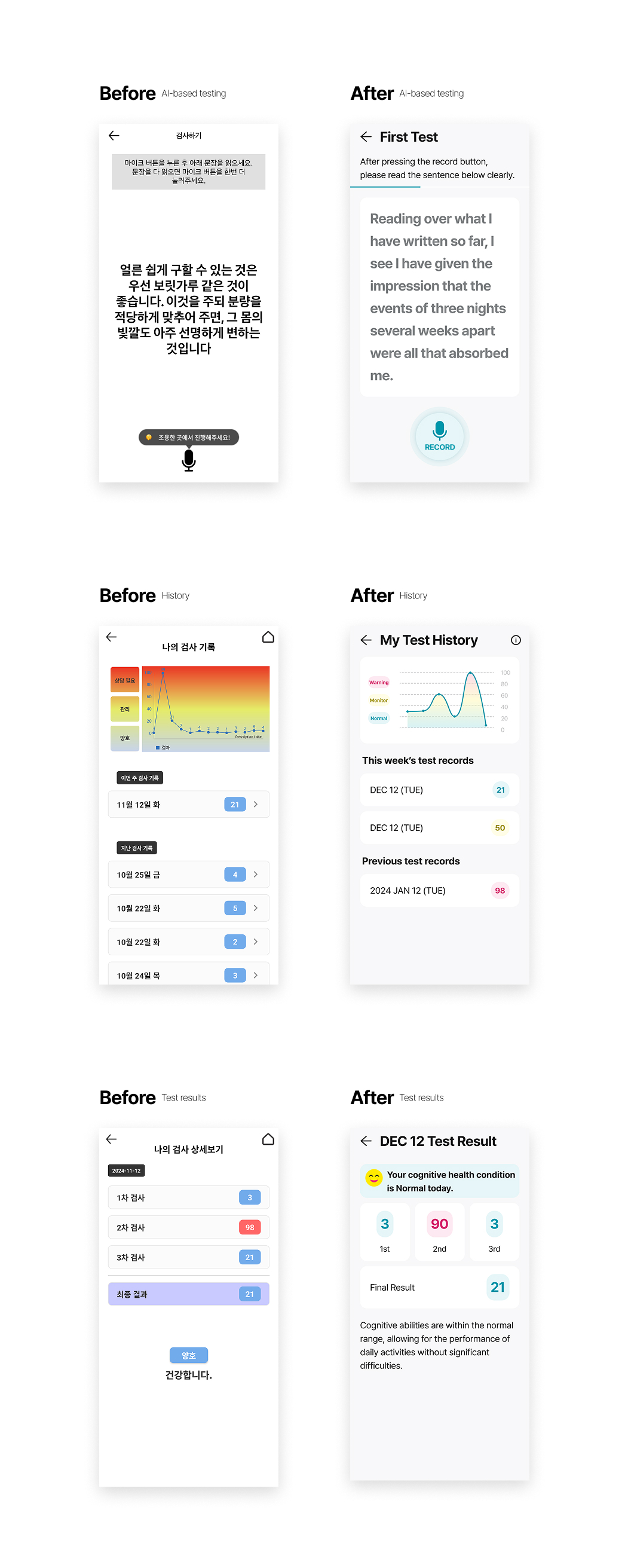
To enhance user trust in the AI functionality, we incorporated visual cues that simplified the interaction. Additionally, to make the experience more engaging, we added 3D interaction elements, which were integrated when the results were displayed. This was designed to create a more intuitive and immersive experience for the users.

Following the redesign, user satisfaction significantly improved. Particularly among elderly users, the app’s accessibility was greatly enhanced, and feedback indicated that the voice recognition feature was very convenient. Test results showed a 40% increase in app usage time, with a 30% increase in retention rate, indicating more elderly users were consistently engaging with the app. Additionally, the design renewal led to a positive outcome in building trust in the AI-based services.
The biggest takeaway from this project was the importance of user-centered design and clear communication. Given the elderly user base, it was essential to focus on accessibility and intuitiveness, and design elements that would earn their trust. The voice recognition feature and simplified interface proved to be highly effective, and the positive feedback from users confirmed their value. One of the challenges was enhancing the voice recognition feature by adding 3D animation interaction elements. However, I faced unexpected difficulties in exporting the animations as Lottie files. This caused delays and required more time and resources to ensure smooth implementation. I compared various tools and formats and ultimately found the best solution to achieve the desired outcome. This experience reinforced the significance of early-stage collaboration and ensuring that designs are feasible with the available technology. In the future, I plan to focus on establishing clearer communication with development teams to avoid such challenges and deliver smoother implementation.